Start here
If your company has more than one site, more than one shift, or more than a few dozen employees, attendance is no longer a simple punch-clock problem. It is a daily operations problem.
Who arrived on time? Which branch is short-staffed today? Which punches can payroll trust? Can headquarters see every site without waiting for USB files or WhatsApp screenshots?
EPORDO Cloud Attendance answers those questions with one system: biometric terminals on site, plus a secure web platform in the cloud. No local attendance server. No desktop software to install. One account for every branch.
This article explains how the system works, who it is for, how to set it up correctly, and how to avoid the mistakes that cause “the report looks wrong.”
1. What “cloud attendance” actually means
Cloud attendance is not a phone app glued onto an old machine. It is a complete time-and-attendance model:
- Employees verify identity on site — face, fingerprint, card, or password on an EPORDO terminal.
- The punch is sent to the cloud in real time — as long as the device has internet.
- Managers work in a browser — PC, tablet, or phone, on any common operating system.
- Reports, leave, overtime, and exceptions live in one portal — headquarters and branches share the same data, with different permission levels.
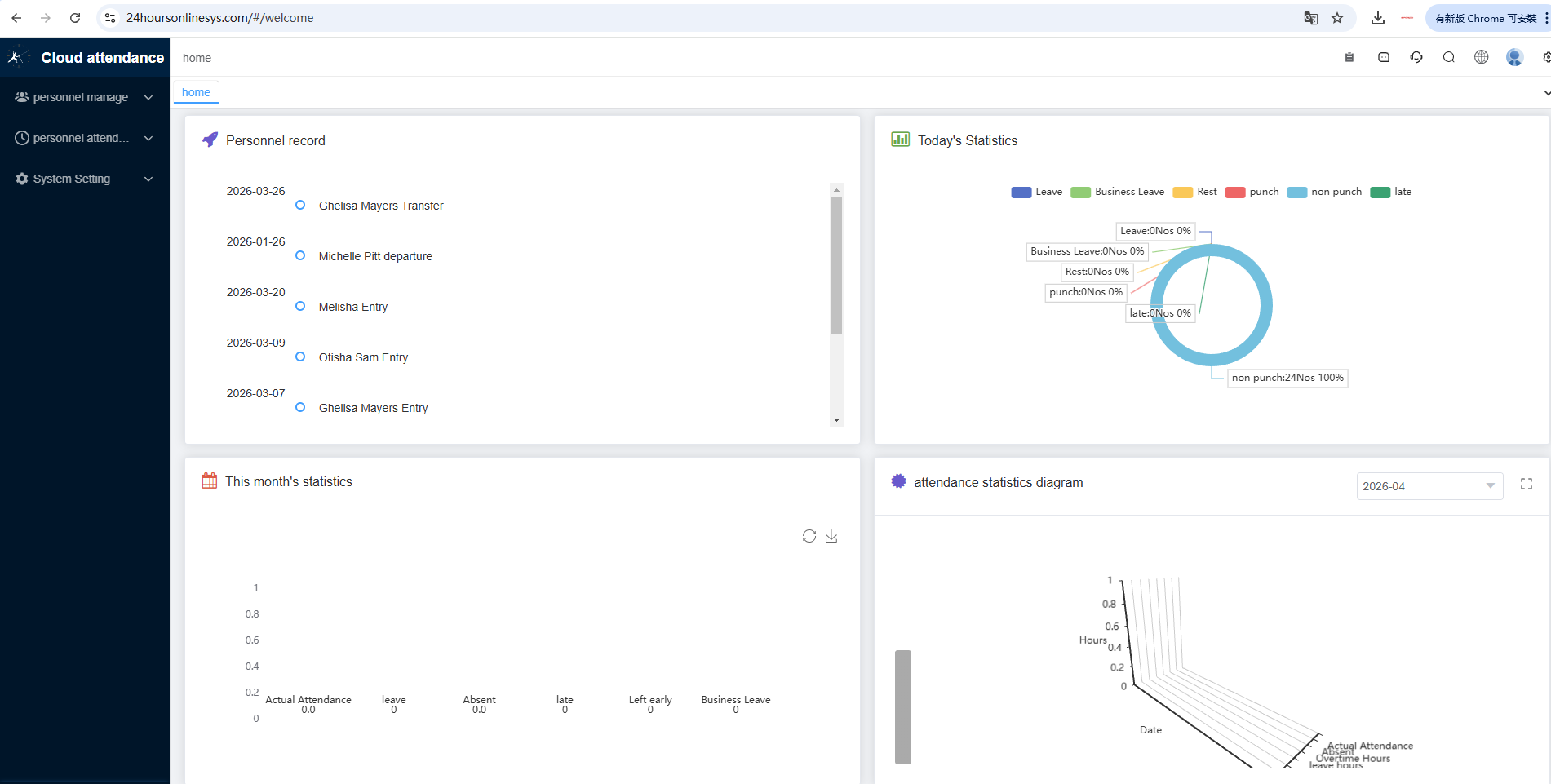
The practical result: attendance becomes a live dashboard, not a delayed spreadsheet.
| Old local system | EPORDO Cloud Attendance |
|---|---|
| Software installed on a PC or local server | Open a browser. No install. |
| USB download or delayed reports | Real-time punch sync |
| One system per site | One login for all branches |
| Fixed public IP and IT project | Wi-Fi or normal network. No fixed IP required |
| Paper leave / overtime forms | Employee self-service + manager approval |
| A new store means another IT setup | Add a device by Cloud SN and go live |
2. Who this system is built for
EPORDO Cloud Attendance fits organizations that share one challenge: many locations, many shifts, many people.
- Chain supermarket, pharmacy, and restaurant groups
- Hotels and hospitality groups
- Manufacturing plants and warehouses
- Security, cleaning, and construction companies
- Schools and multi-campus organizations
- Distributors and system integrators who serve those industries
If you manage one small office with a single shift, a simple terminal may be enough. If you open new sites, rotate night shifts, send people into the field, or close payroll every week, the cloud model is the right foundation.
3. Hardware + cloud: one system, not two products
EPORDO designs the terminal and the software to work together.
On the wall: biometric terminals
A typical cloud terminal (for example ET-F7) can verify by face, fingerprint, password, or induction / RFID card. Records stay on the device if the network drops, then sync when the connection returns. Optional Wi-Fi helps sites where Ethernet is difficult. An optional backup battery keeps punching available during a short power cut.
EPORDO supplies a full cloud hardware range. The right model depends on site size, budget, and verification method. The software experience stays the same.
In the browser: EPORDO Cloud
Managers use:
- Admin / HR portal: https://24hoursonlinesys.com/#/login
- Employee portal: https://24hoursonlinesys.com/#/employee
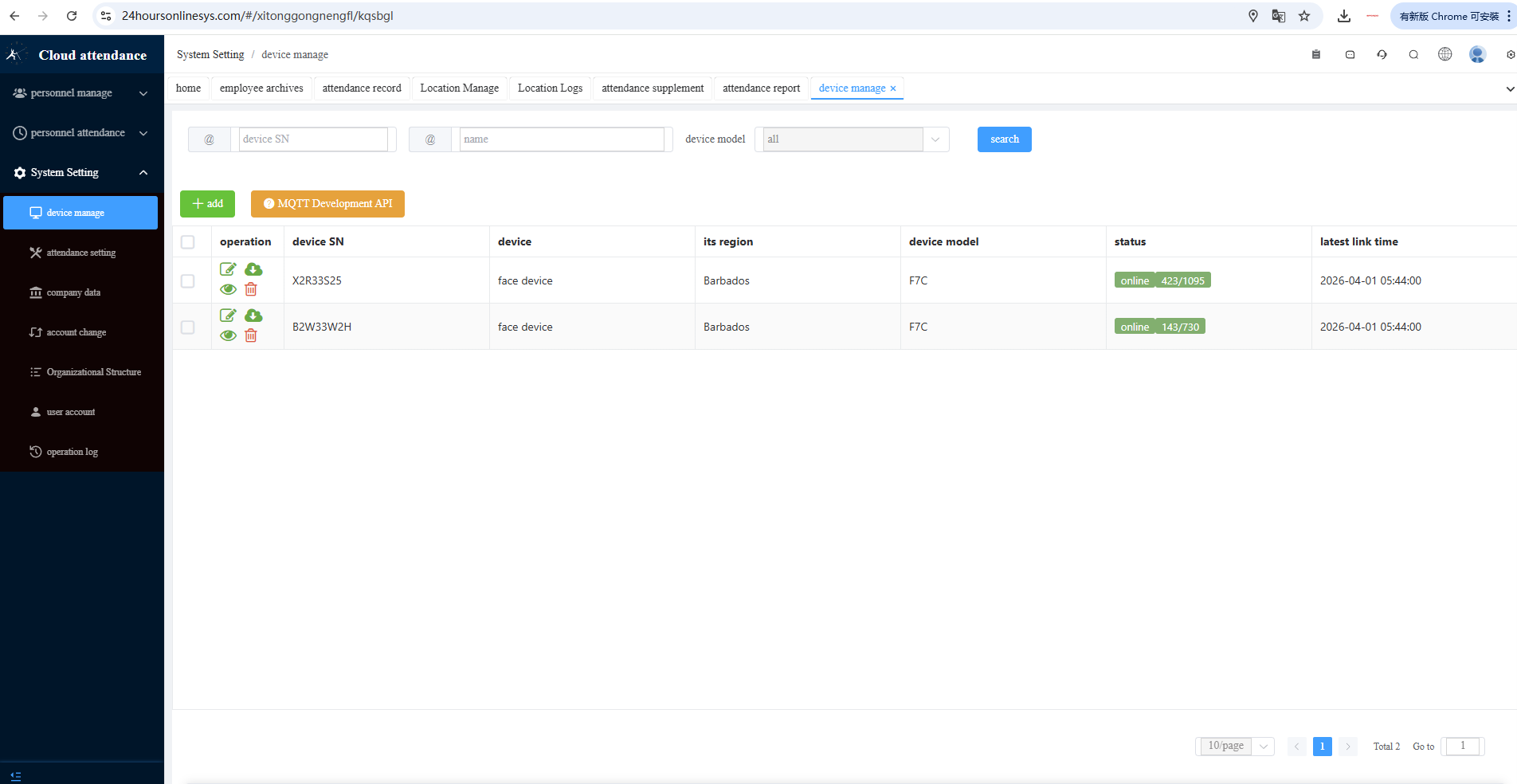
From one account you can see device status across cities, manage departments and employees, set shifts and overtime rules, review exception reports, approve leave, and track field staff with map-based location check-in.
OEM branding and private deployment are available for partners and regulated projects.
4. How a normal day looks
For the employee
Arrive and verify on the terminal (face or fingerprint is fastest). Punch out inside the allowed window. If needed, open the employee portal to check records, request leave or overtime, or clock in from the field with location.
For the branch manager
See who is present today without collecting paper. Approve leave and missed-punch requests online. Manage the local team, while headquarters still sees the same records.
For headquarters / HR / payroll
One login covers every branch. Late, absence, early leave, and overtime appear in reports. Export for payroll instead of rebuilding spreadsheets. Graded permissions: HQ sees all; a branch sees its own people.
5. Go live in three steps
Customers often overestimate the IT work. For standard cloud use you do not need a local server, a dedicated PC, or a fixed public IP.
Power & connect
Power on the terminal. Connect Wi-Fi or a network cable. Internet is enough.
Register & bind
Create a cloud account. Bind the device with the Cloud SN labeled on the back of the machine.
Enroll & manage
Create employees in software, then enroll face / fingerprint on the device. Punches start flowing in real time.
Just power, connect, and manage the entire workforce in the cloud.
6. The golden rule (read this before enrollment)
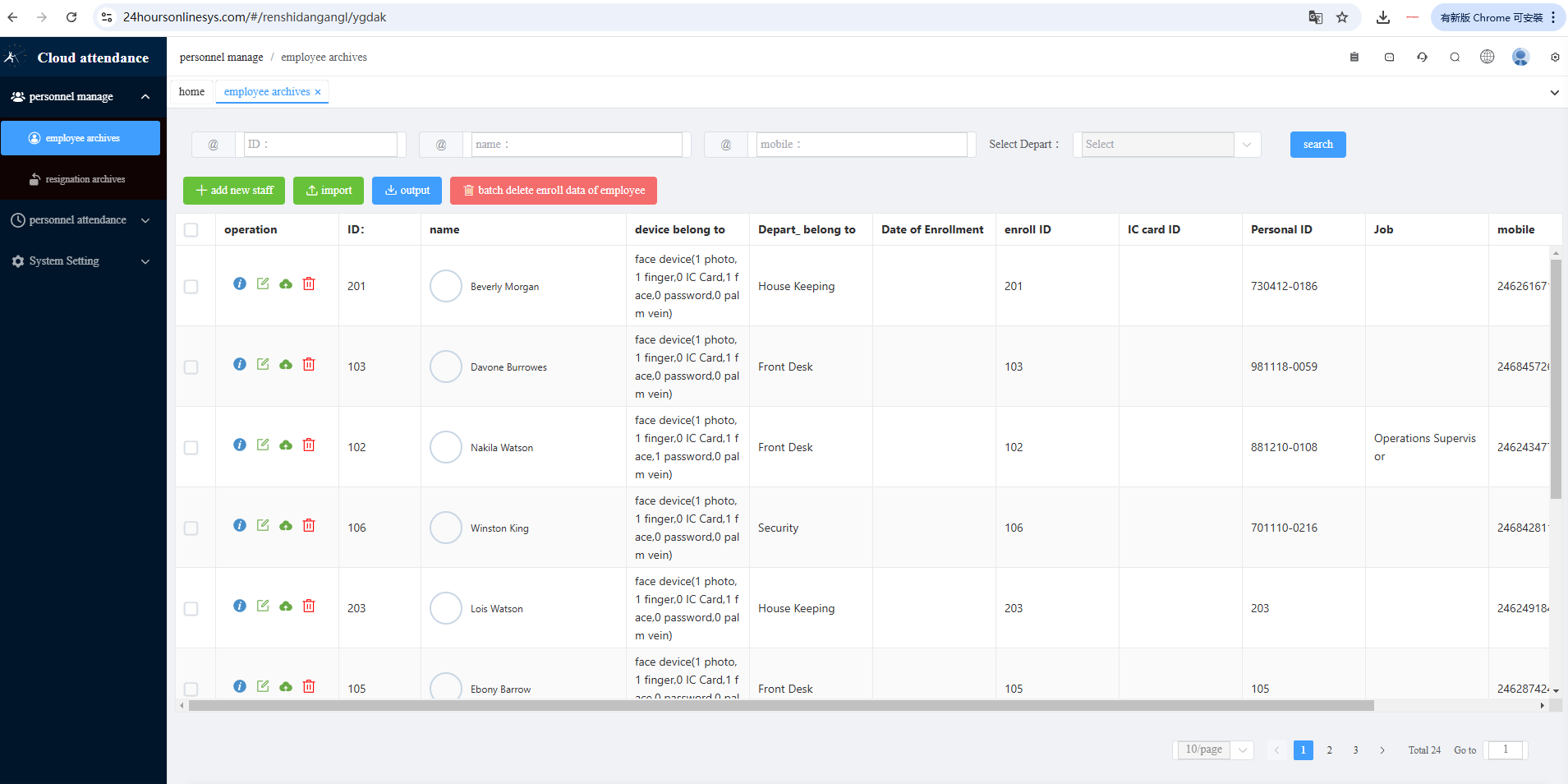
Most first-week problems come from one mistake: creating users only on the device keypad.
If the person never appears on the machine, check three things: Was the user created in software? Does the department match the device? Is the device online?
Bulk import by Excel is available for larger rollouts. After any important change, use device sync / Issue staff if automatic sync needs a push.
7. Shifts, explained without jargon
Wrong shift settings are the most common reason a customer says “punches are in the record, but the daily report is wrong.”
Keep two ideas separate:
- Shift time = official working hours used for late / early / work-hour calculation. Example: 08:00–17:00.
- Punch window = the time range when the system accepts a valid IN or OUT punch. Example: IN 07:00–09:00, OUT 16:00–20:00.
If someone punches outside the window, the raw record may still exist, but it may not count as a valid IN/OUT in the report. Tell employees both times.
| Type | Use when | How it works |
|---|---|---|
| Fixed / normal shift | Office, factory, store with known start and end | Official hours + punch windows |
| F1 free shift | Flexible teams | First punch of the day = IN; last punch = OUT |
| F free shift | Split or multi-in/out days | Up to four IN/OUT pairs per day |
After you change a shift or rule, generate (or regenerate) the daily report. New rules do not rewrite history until you ask the system to rebuild. Weekly reports are available for companies that settle attendance or payroll by week.
8. Field staff, outdoor work, and location check-in
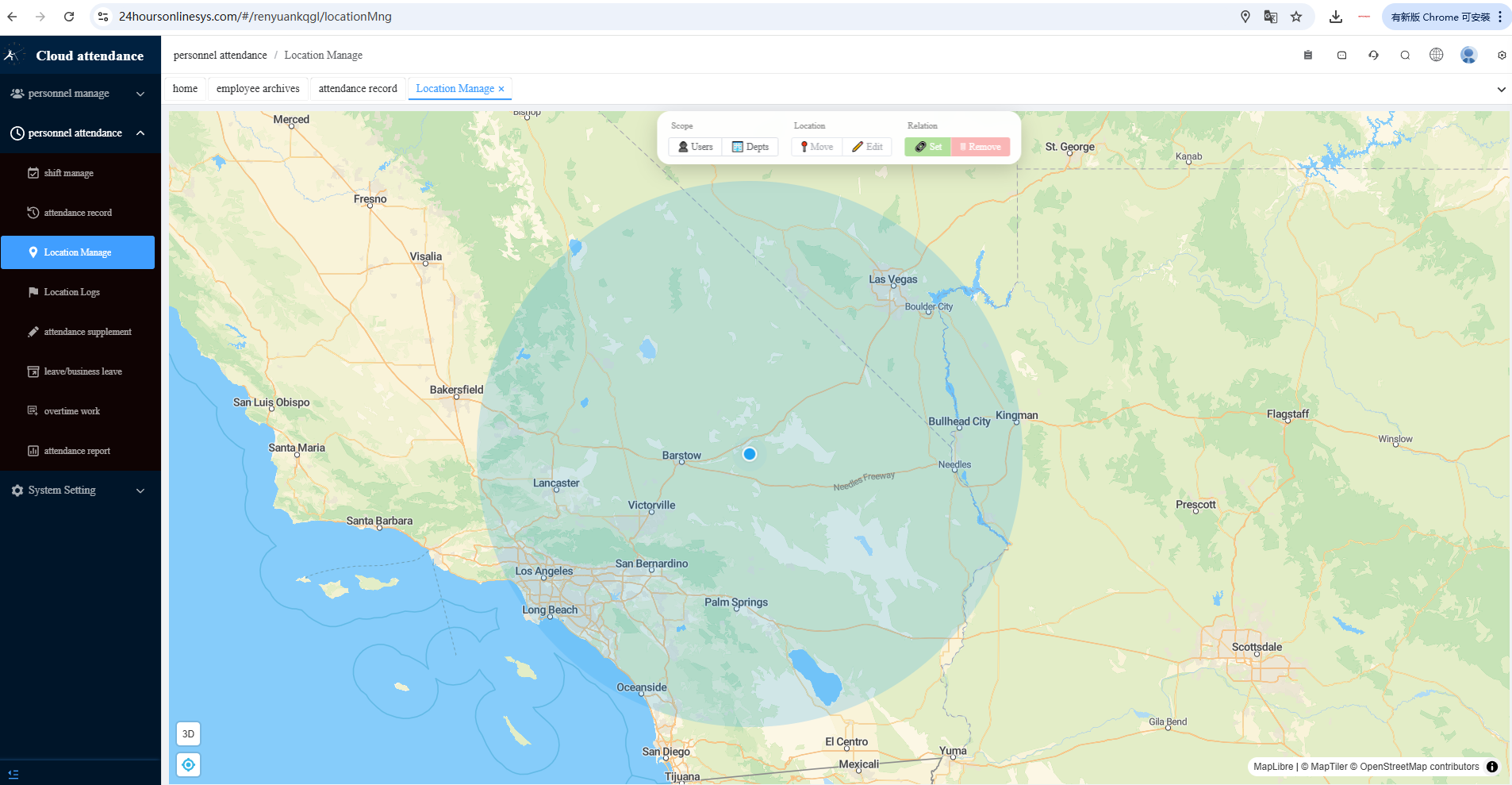
Not every employee stands in front of a wall terminal. EPORDO Cloud supports remote / outdoor clock-in from the employee portal (photo can be required) and location management / geofencing — define map zones, assign them to users or departments, and keep location logs for audit.
This is how security companies, cleaning teams, construction sites, and traveling supervisors stay on the same attendance system as office and factory staff. A terminal is still the best choice for a fixed gate. Location check-in is the complement for people who move.
9. What managers actually use every week
- Dashboard — today’s mix, monthly KPIs, charts
- Device management — online status, Cloud SN, department assignment
- Attendance records — live punches from every site
- Exception ranking — late, early leave, absence, overtime
- Leave / overtime / supplement approval — paperless workflow
- Export — reports for payroll and management review
Employee self-service reduces HR traffic: staff can see their own records instead of asking for a printout.
For standard cloud deployment you do not need a local attendance server, desktop software, a fixed public IP, or a per-site reinstall when you open a new branch. Product documentation describes no per-user licensing for expanding devices and employees on the same account. You still need stable internet at each terminal, a clear department structure, and someone responsible for shift rules.
10. Common mistakes — and how to avoid them
- Enrolling on the device first. Always create the person in software, then enroll biometrics.
- Department mismatch. The employee and the device must share the assigned department, or the user will not sync.
- Punch window too narrow. If people arrive at 07:40 but IN only starts at 08:00, valid early arrivals will not count.
- Changing rules without regenerating reports. After a shift change, regenerate daily reports before you send numbers to payroll.
- Assuming an offline device is “broken.” Check cable / Wi-Fi, router internet, reboot, then confirm the Cloud SN is in Device manage. Offline punches can still be stored and uploaded later.
- Outdoor installation without protection. Long-term outdoor use is not recommended unless you add shade, cooling, or winter protection as required for the model.
- Mixing HQ and branch logins. Give graded roles. Headquarters should not share one password with every store manager.
11. Questions customers ask first
Do I need a local server?
No. Internet is enough for standard cloud use.
Do I need a fixed IP?
No. Remote deployment works over Wi-Fi or a normal network.
Can headquarters and branches have different permissions?
Yes. Graded management: HQ sees all; branches manage their own teams.
Do records sync in real time?
Yes, when the device is online. If the network drops, punches stay on the device and sync when it reconnects.
Can field staff clock in without a terminal?
Yes. Mobile / location check-in with optional geofencing.
Where do employees log in?
Admin: https://24hoursonlinesys.com/#/login · Employee: https://24hoursonlinesys.com/#/employee. The employee username is usually the mobile number stored in the archive; the login password is set in the employee record.
Is OEM or private cloud available?
Yes, for partners and regulated projects.
12. A 30-day success checklist
Week 1 — Foundation
- Create the company account and set region / time zone
- Add devices by Cloud SN and confirm they show online
- Build departments that match real sites
- Import or create employees in software
Week 2 — Enrollment & shifts
- Enroll face / fingerprint after users appear on the device
- Set fixed shifts or F1/F for flexible teams
- Explain punch windows to staff
- Test a full in/out cycle at each site
Week 3 — Daily use
- Train branch managers on approvals
- Open the employee portal for self-service
- Turn on location check-in only for field roles that need it
Week 4 — Payroll ready
- Review exception ranking
- Export a weekly or monthly report
- Adjust windows or overtime rules once, then regenerate
- Assign graded admin roles so HQ and branches stay clean
If this checklist is done, the system is no longer a “new machine.” It is the attendance standard for the company.
Where to learn more
Open the existing EPORDO pages below. Each link opens the same page your team already uses.
Talk to EPORDO
The Cloud Attendance Specialist — Shenzhen EPORDO Co., Ltd. Accurate punches, live visibility, and payroll you can trust, from one cloud account.
- Website: www.epordo.com
- Tel: (+86) 0755-83418779
- Sales WhatsApp: 0086 18665332487
- Tech WhatsApp: 0086 15815501089
- Email: sophia@securiticn.com
- Manager login: 24hoursonlinesys.com/#/login