
Target
Who Is This For
- Small Hotel Owners
- Boutique Hotel Owners
- Hotel Managers
- Property Managers
- Hotel Operators
- Airbnb & Short-Term Rental Operators
- Hotel Lock Installers
- Smart Hotel System Integrators
- Hotel Security Solution Providers
- Hotel Lock Distributors
INSIGHTS
What’s Inside This File
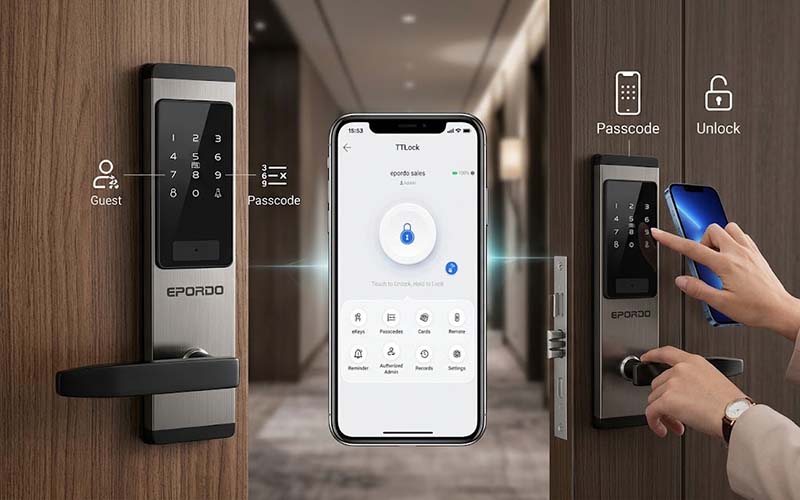
- Smartphone-Based Hotel Lock Management
Use the TTLock App on a smartphone to manage compatible smart hotel locks through Bluetooth. - Easy Lock Setup
After receiving the hotel lock, turn on Bluetooth on your smartphone, open the TTLock App and add the lock to the system. - Remote Guest Access
Hotel managers can provide guests with digital access credentials without requiring guests to collect a traditional physical key card from the front desk. - Temporary Passwords
Create temporary access passwords for guests according to their stay and access requirements. - One-Time Passwords
Provide one-time passwords for specific guest access situations when temporary - Keyless Hotel Check-In
Allow guests to access their rooms using digital passwords instead of relying only on traditional physical hotel key cards. - Self Check-In
Guests can receive their access credentials and unlock the assigned room without waiting at a traditional front desk. - Suitable for Small Hotels
The solution is particularly suitable for small hotels and properties looking for a simple way to manage guest room access remotely.
Frequently Asked Questions
Is TTLock App free?
Yes,The TTLock App can be downloaded and used to manage compatible smart locks. Specific TTLock services or functions may depend on the lock model and system configuration.
How do I add the lock to TTLock?
Turn on Bluetooth on your smartphone, open the TTLock App and follow the lock management process to add the compatible lock.
Can I manage the hotel lock from my smartphone?
Yes. Compatible EPORDO smart hotel locks can be managed through the TTLock App on a smartphone.
Can I send a password to a hotel guest?
Yes. Hotel managers can provide guests with temporary or one-time access passwords for room entry.
Can guests check in without getting a key card from the front desk?
Yes. With a compatible TTLock hotel lock system, guests can use digital access credentials to unlock their assigned room without relying on a traditional physical key card.
Can I send a temporary password to a guest?
Yes. Temporary access passwords can be provided to guests according to their stay and access requirements.
Can I create a one-time password?
Yes. One-time access passwords can be used when temporary or limited guest access is required.
Is TTLock suitable for small hotels?
Yes. TTLock-based smart hotel access is particularly suitable for small hotels, boutique hotels and other properties looking for convenient guest self check-in.
Does the system require a front desk?
The smart lock and TTLock access method can reduce the need for traditional front-desk key card handling. However, the exact hotel operation model depends on the hotel's management requirements and system configuration.
Need help setting up your system,Need a complete solution?
We provide full technical support and customerized solutions.